Why a Weekly Calendar Works Better as a Map Than a To-Do List
A weekly calendar works as a map of commitments, making fixed time visible while a separate task list keeps details easy to scan and adjust.
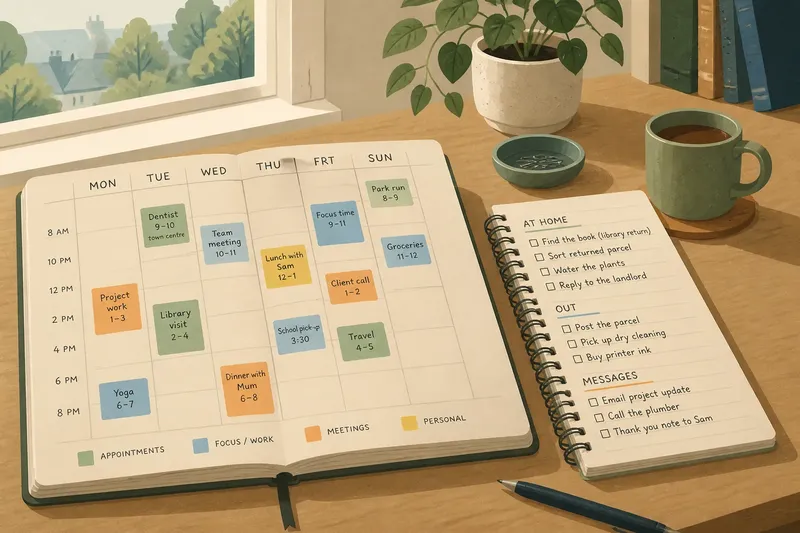
You open your weekly calendar to check when the dentist appointment is, then discover a grocery list, three work tasks and a reminder to water the plants crowding the same square. A weekly calendar works better as a map than a to-do list because it shows where time is already spoken for; a separate list can hold the tasks whose timing is still flexible.
Think of the calendar as a street map and the task list as the note you carry for the day. The map shows where you need to be and the routes between commitments. The note keeps the small errands together without turning every hour into a destination.
1. Give each tool one job
A calendar is clearest when it answers questions about time: What is fixed? Where must I be? When do I need to leave? A task list answers a different question: What needs doing, even if I have not chosen the moment yet?
That distinction gives each entry a natural home. Put a meeting, appointment, class or reserved block of focused work on the calendar. Put “reply to the landlord” or “sort the returned parcel” on the task list unless a real time or deadline makes it calendar-worthy.
Use a simple test before writing anything: does this item claim a particular point or stretch of time? If yes, place it on the calendar. If it can move without breaking a promise, keep it on the list.
2. Make fixed time visible
A weekly grid makes commitments comparable at a glance. A Thursday appointment sits beside Thursday’s other obligations, so the page can show whether that day has room for a longer task or only for small jobs between errands.
Write commitments in words that make their shape clear. “Dentist” may be enough if the location and travel are familiar; “dentist, town centre” can be more useful when the place affects the rest of the day. If travel matters, reserve it as a separate block rather than pretending the appointment begins at your front door.
Keep entries short enough to scan. A calendar is not the place for the full agenda, a list of questions or every preparation detail. A few words should identify the commitment; any extra notes can sit in the task list or on a slip attached to the relevant page.
3. Separate tasks from appointments
To-do items often have uncertain duration, uncertain order or both. Writing every one into an hourly grid can make a flexible week look rigid. If an earlier task runs long, the rest of the page may appear to have failed, even though the real problem is simply that the tasks were never appointments.
Keep a separate list grouped by useful context, such as “at home”, “out” or “messages”. These headings help you notice which tasks can travel together. A single blank line between groups can be enough; elaborate colour systems are optional, not a prerequisite.
Link a task to the calendar only when timing matters. If you have promised to send a document before a meeting, give the deadline a visible place or add a brief calendar note, then keep the actions needed to prepare it on the list. This preserves the date without stuffing the appointment box with working notes.
4. Leave room for transitions
Commitments do not always begin and end neatly at their printed times. A meeting may need preparation, an errand may involve travel, and a family call can leave little room for the job planned immediately afterwards. A map that shows only destinations can hide the journey.
Where a transition affects the day, mark it plainly: “travel”, “collect parcel” or “prepare notes”. Add only the detail that helps you judge the gap. If the journey is familiar, a short label is enough; if several stops depend on one another, list their order separately.
Imagine you have a library visit on Tuesday afternoon and need to return a borrowed book first. Put the visit and the return on the calendar if they shape where you must be, and put “find the book” on your home task list. The visible result is a calendar that shows the outing and a list that retains the small preparation job.
5. Use the page to spot pressure
Once fixed commitments are on the calendar, the open spaces become informative. A run of appointments across several days may leave little energy for household jobs, while an open morning may suit a task that needs concentration. The blank space is not an instruction to fill it.
Look at the week as a whole before assigning flexible work. If the page contains several demanding commitments, choose fewer list items for the busiest days. A short list of likely tasks is easier to use than a catalogue of everything you hope to accomplish.
Leave some time unclaimed when your routine allows. That space can absorb a late-running appointment or give you a choice about what to do next. On paper, an empty block is a visible option, not wasted real estate.
6. Keep details easy to find
Separate tools work only if you can move between them without hunting. Place the task list beside the weekly spread, use the same page marker for both, or write a small pointer such as “see errands list” beside a relevant calendar entry. Choose the simplest arrangement you will notice.
Make list items concrete enough to act on. “Paperwork” can mean anything; “sign the form and put it by the front door” gives you a clear next action. If a task depends on another person or a specific place, include that cue so the list stays useful outside the moment you wrote it.
When a task acquires a firm date, move that commitment into view rather than copying it everywhere. A deadline belongs where you will see the time constraint; its supporting actions can remain on the list. This keeps one clear home for the date and avoids conflicting versions.
7. Let plans change cleanly
A week is a working map, not a contract with every blank filled in. When an appointment moves, cross it out once and rewrite it in its new place. When a flexible task slips, move it on the list or leave it for a later review instead of scattering it across the calendar.
Use marks that distinguish a change from a completed commitment. A single line through a cancelled item keeps the original entry legible, while a small arrow can point to its new date. If your handwriting becomes hard to read, rewrite the entry rather than layering so much ink that the page turns into a puzzle.
Check the calendar and list together at a natural pause, such as before leaving home or at the end of the workday. Ask what has become fixed, what can move and what no longer needs doing. That brief check keeps the map current without turning planning into a second job.
Questions readers ask?
Should every task go on the calendar?
No. Put a task there when it has a fixed time, deadline or location that affects the day. Keep flexible actions on the separate list so you can choose when to fit them in.
Where should deadlines go?
Record the deadline on the calendar if missing it would matter, and keep the steps needed to meet it on your list. If the deadline is several days away, place it where it will be noticed during a normal weekly scan.
How much detail belongs in an appointment?
Include enough to identify the commitment and make the timing usable, such as its place or a travel reminder. Keep agendas, questions and preparation actions elsewhere unless a brief cue on the calendar will prevent a missed transition.
What if a week has very few appointments?
Keep the calendar light and let the list hold the flexible work. You can reserve a broad block for a task that needs protected time without assigning every small action its own slot.
A weekly calendar works best when it shows the shape of your time rather than every intention in your head. Keep fixed commitments, meaningful transitions and deadlines visible; let the separate list carry the movable details. The next time a page starts to feel crowded, ask whether each entry is a place in time or simply something to do—and give it the space that fits.